


Guide to Download Capital Gain Statement from Anand Rathi
Introduction
- Capital gains are profits one earns from the sale of assets such as stocks, mutual funds and real estate. The gains will be classified as short term or long term based on how long they have been held.
- Instead of manually entering the details you can simply upload a “Capital Gains Statement” that is a consolidation of your investment performance, capital gains and income on Anand Rathi for the current and last financial years.
- This guide covers the step by step procedure to fetch this gain statement from the Anand Rathi website.
If you need professional assistance beyond capital gain statements, TaxFilr offers reliable tax preparation services to simplify compliance, minimize errors, and ensure accurate filing for salaried individuals, traders, and business owners across India.
Process for Anand Rathi Capital Gains Statement
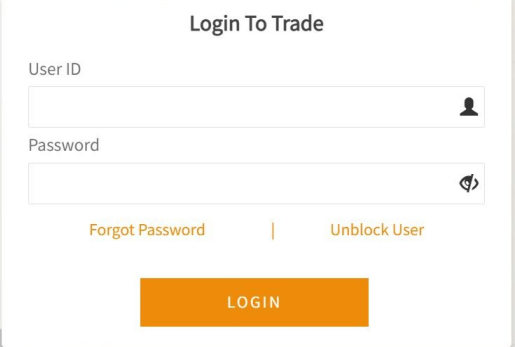
Step1: Login to your Anand Rathi Demat Account
- Click on the following link https://tradexpress.rathi.com/AR/userMaster/login
- Enter Login credentials.
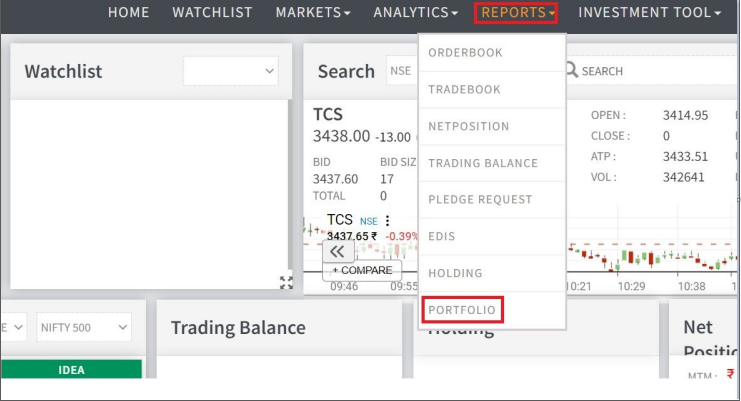
Step 2: Navigate to the Portfolio Section
- Clickon Reports and then select ‘Portfolio’
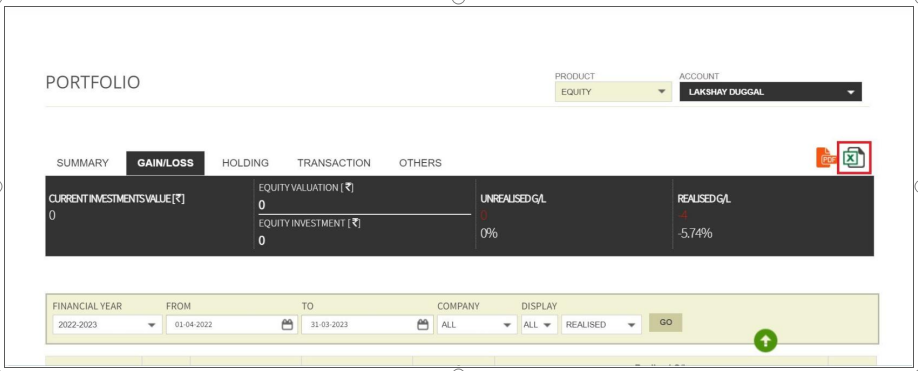
Step 3: Download the Profit & Loss Statement
- Select‘Gain/Loss’ tab in the portfolio page
-
Then click on “Excel” icon to download the report
For personalized guidance, you can consult an experienced income tax consultant online through TaxFilr, helping you interpret capital gain statements correctly, calculate liabilities, and file returns without confusion or last-minute stress.
After downloading your capital gain statement, you can opt for expert online ITR filing services to ensure accurate reporting of short-term and long-term gains, proper tax calculation, and seamless return submission within deadlines.